

Maximize Your Reach: Google Business Profile Categories for Dentists
If you’re here you probably already know that the google business profile (GBP formerly Google My Business, GMB, I’ll use both sometimes because names change and so do I) categories are weirdly important.
They decide when you show up in Google Search and Maps, in the Local Pack, and basically whether your clinic gets found by actual patients or just disappears into the void in the search engine .
This guide is going to walk you through choosing a primary category as part of your dental practice business profile for dentists, picking secondary categories.
Also show ideal category combinations for common dentist/orthodontist setups that can help attract more patients , explain practitioner listings (when to list individual clinicians vs. the practice).
Let’s do this.
Quick reality check: why Google Business Profile Categories for Dentists matter

Short version:
Google uses the primary category to understand what your business is and which searches it should appear for.
Secondary categories add nuance. Choose poorly and you’ll either show up for irrelevant searches or not appear when potential patients search for services you actually offer in local search results . So yeah this matters.
Longer version (because I always over explain):
GBP category influences the Local Pack (that little map + three results box), Maps results, and sometimes which features are shown like “Book online” or service-specific callouts.
Categories don’t directly control rankings the same way content and reviews do, but they’re a strong relevancy signal for effective google business profile optimization.
So pick them like you’re picking a billboard headline not like you’re throwing spaghetti at the wall.
Basic rules of the road (do these first)
Primary category: the big choice (examples)
This is the big decision. Pick the primary category that represents your core business.
Below are the most common good choices for dentists and orthodontists:

Side note: if you split your time between general dentistry and cosmetic work, ask yourself what pays more and what patients search for in your area.
Choose the category that matches the majority of patient intent to attract potential customers and local clients .
Secondary categories: how to layer the nuance
Secondary categories are where you get to be useful and specific. They don’t override the primary category, but they tell Google “hey, we also do this.”
Good secondary categories for dentists include:

Don’t use irrelevant categories (like “medical clinic” unless you actually provide broader medical services). It confuses Google’s signal and it confuses people.
Ideal category combos: based on practice type (copy paste these)
Okay, here’s the part you wanted: a cheat sheet. Pick the combo that fits your practice to attract new patients. Primary first, then secondaries.
- Solo general dentist (adult focused)
- Primary: Dentist
- Secondary: Dental clinic, Teeth whitening service, Emergency dental service, Dental implants provider (if you place implants)
- Group clinic / multi doctor practice
- Primary: Dental clinic
- Secondary: Dentist, Cosmetic dentist, Pediatric dental clinic (if you serve kids), Dental implants provider, Emergency dental service
- Orthodontic practice (specialist)
- Primary: Orthodontist
- Secondary: Dental clinic (optional), Teeth whitening service (if you offer whitening), Pediatric dental clinic (if you do child ortho)
- Pediatric dentistry
- Primary: Pediatric dentist
- Secondary: Dentist, Dental clinic, Emergency dental service
- Cosmetic-focused practice
- Primary: Cosmetic dentist
- Secondary: Dentist, Teeth whitening service, Dental implants provider, Veneer service (if available)
- Specialist referral clinic (oral surgery, endodontics)
- Primary: Oral surgeon / Endodontist / Periodontist (pick the exact specialty)
- Secondary: Dental clinic (if patients come to a physical clinic), Dental radiology (if you have imaging), Dental implants provider (if relevant)
Repeat after me: pick the primary category that best represents the main service people search for, which can lead to more positive reviews. in your area.
Practitioner listings vs practice listing, when to use each
You can list individual practitioners with their name address and phone as providers under a clinic (doctors) as providers under a clinic or as separate GBP listings in some setups.

Here’s the gist:
Side note: practitioner listings can be helpful for doctors who build reputation outside the practice (talks, media).
But they require careful management so you don’t end up with ten listings for the same address. Ask your SEO person (or me, I’ll do it).
How to actually set these categories in GBP (step-by-step)
- Sign in to business.google.com.
- Select your profile (or create one).
- Click Info.
- Click the pencil icon next to the category field.
- Set your Primary category first. Then add up to 9 secondary categories.
- Save and then double check how it appears in search and maps.
Don’t forget: changes can take some time to propagate. Check both mobile and desktop.
Common mistakes people make (I see these all the time)
Audit checklist: quick (copy this into your practice playbook)
Examples (realistic sample profiles)
Here’s how you might write your categories for two hypothetical practices:
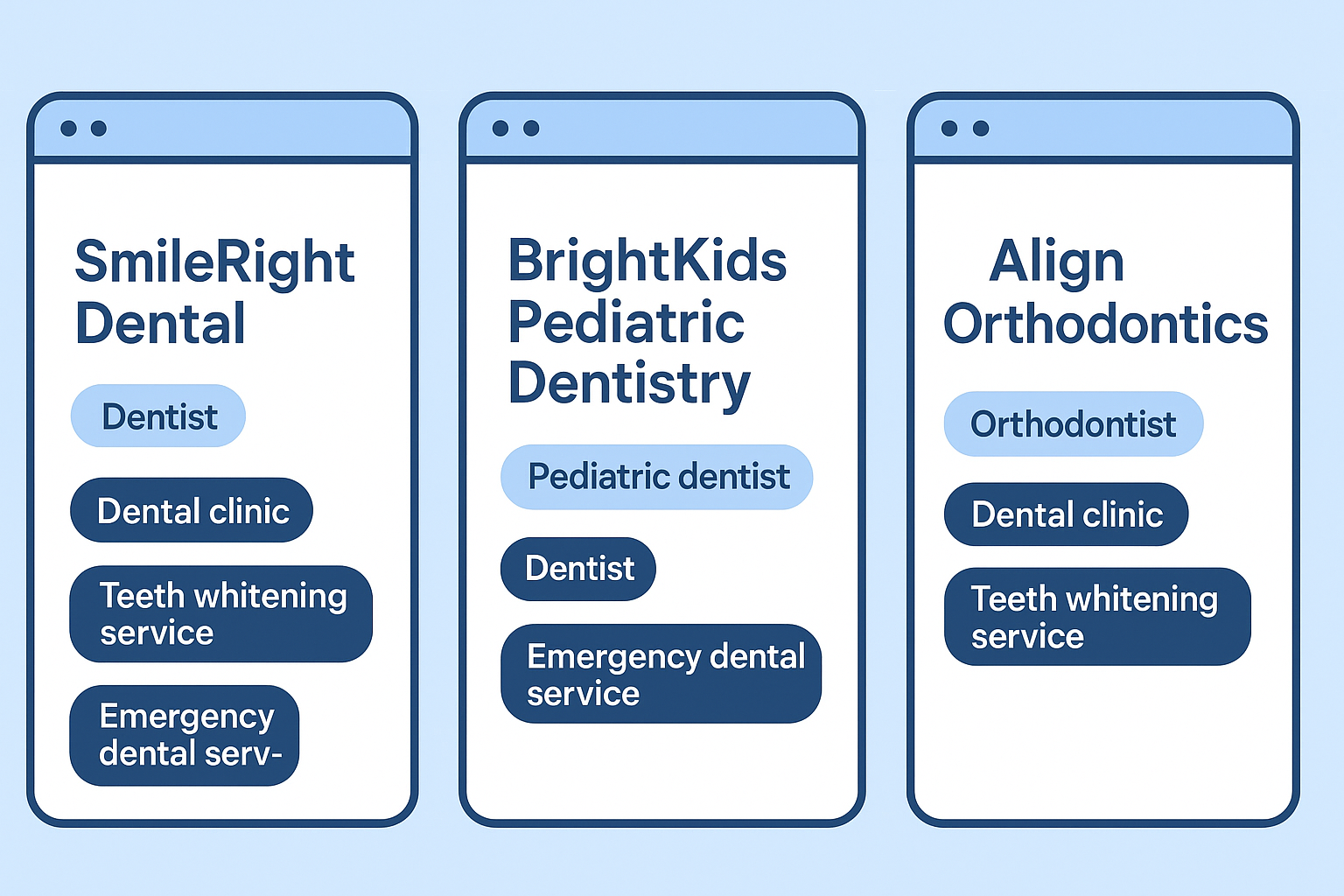
SmileRight Dental (General, small clinic)
BrightKids Pediatric Dentistry
Align Orthodontics (specialist)
FAQs: short and useful
Q: What’s better: Dentist or Dental clinic as primary?
A: If you’re a single dentist, I usually recommend Dentist. For group practices, Dental clinic often makes sense. Look at competitors in your area what do top rankers use? That’s a good hint.
Q: Can I change my primary category later?
A: Yes. You can change your business category whenever. But don’t flip back and forth make a plan and test for a few weeks. Changes take a bit to stabilize in search results.
Q: Does adding Emergency dental service increase emergency calls?
A: It can. If you offer emergency walk-ins and want those patients, add it. But be ready to handle after-hours calls or be very clear about actual hours. Otherwise you’ll get frustrated. (Been there.)
Q: Will Google penalize me for too many secondary categories?
A: Google doesn’t penalize you per se, but too many irrelevant categories weaken your relevancy signal, which can affect google reviews and patient reviews . Keep it tidy.
Side notes: things I’d tell my receptionist
Final thoughts (not neat, just honest)
Okay look GBP categories aren’t sexy. They’re boring administrative stuff. But they’re also the little lever that helps Google understand your practice, which is crucial for your overall digital marketing strategy.
Pick a truthful primary category, add sensible secondaries, and ensure your website links are correct.
Align your website content, and make sure your address and phone number are up to date and your reviews are solid. That combo will move the needle more than any single trick.
If you want, I’ll do a free quick audit: give me the clinic name as it appears on Google (or paste the GBP link) and tell me the city/zip.
I’ll scan the likely primary category choice, suggest 3–5 perfect secondary categories, flag any obvious profile mismatches (like different phone numbers or missing verification code ), and give a one page checklist you can hand to your front desk.
Wanna do that? Paste the GBP link or the exact business name and city and I’ll dig in.